How Small Businesses Can Create Professional Graphics
Struggling with design? Small businesses often face challenges creating polished graphics due to expensive tools, limited time, and lack of expertise. But visuals are crucial - content with images gets 94% more views, and consistent branding can boost revenue by 23%.
Enter IllustrationsAI, a tool that transforms plain text prompts into high-quality, branded illustrations. Skip complex software and costly freelancers - this platform makes it easy to create graphics in minutes. Upload your brand colors, train the AI, and get consistent visuals for social media, websites, and more.
Key takeaways:
- Save time and money by generating custom graphics without design skills.
- Use prompts to create targeted visuals and refine them with ease.
- Export in multiple formats (SVG, PNG, JPG) for web, print, and beyond.
- Affordable plans scale with your business needs, starting at $38/month.
IllustrationsAI simplifies design, letting you focus on growing your business while maintaining a professional look.
6 AI Tools That Improved My Graphic Design Business
Step 1: Set Up Your Brand Style with IllustrationsAI
Creating a strong visual identity is essential for making your brand recognizable and driving revenue. Studies show that consistent visuals are recognized three times faster by users compared to inconsistent ones. Plus, maintaining a consistent brand presentation across all platforms can boost revenue by as much as 23%.
"Visual consistency is no longer just 'nice to have'. Rather it's how small businesses get remembered." - Neelam Goswami, Content Specialist, Narrato
IllustrationsAI simplifies this process by allowing you to train the platform to reflect your brand's identity. Once trained, every illustration it generates will automatically align with your brand's style - eliminating guesswork, saving time, and ensuring consistency.
Upload Your Brand Reference Images
The first step is to gather 15–20 images that showcase your brand's identity. These should include visuals with high engagement, as they provide the AI with a clear understanding of your brand's aesthetic. The platform analyzes these reference images to learn elements like lighting, composition, color schemes, and overall vibe.
Upload these images directly to IllustrationsAI using your Google account. A diverse set of references improves the AI's ability to accurately reflect your style. Include your logo, examples of your primary and secondary colors in use, and visuals that embody your brand's personality - whether it's bold and daring or calm and approachable. Once uploaded, the platform creates a custom style, enabling you to generate illustrations without having to describe your vision in detail every time.
Choose Predefined Styles or Create Custom Packs
IllustrationsAI offers predefined styles inspired by leading brands. These are a great starting point, especially if you're still defining your visual identity. You can use these styles immediately and then transition to creating custom packs for more precise control.
For businesses with an established brand identity, custom illustration packs are invaluable. After training the AI with your reference images, you can group visuals by campaign, product line, or theme - making it easy to create reusable style presets tailored to different marketing needs. You can even store specific hex codes (like #FF5733) to ensure consistent color usage across all your designs.
"Simply upload a few reference images that represent your style, and let our AI handle the rest. It's like having a dedicated design team at your fingertips." - Paul Jeba, Founder of IllustrationsAI
Step 2: Create Custom Illustrations with IllustrationsAI
Once your brand style is established, it’s time to start creating professional illustrations. The process is simple: craft a clear prompt, review the generated image, and refine it until it matches your vision. The key is to communicate your ideas clearly to the AI and make adjustments as needed.
Write Prompts for Specific Visuals
To get the best results, structure your prompt with these elements in mind: Subject, Action, Scene/Setting, Medium, Composition, Lighting & Aesthetics, and Intent. For instance, instead of a vague prompt like "coffee cup", try something more descriptive:
"A matte ceramic takeaway cup, mid-step on a wooden table, flat vector illustration, eye level, soft morning light, for a social media hero image."
Start with a clear subject, add an action, describe the setting, specify the style or medium, define the perspective, set the lighting, and explain the purpose of the image.
For simpler visuals like icons, keep prompts brief by focusing on the subject, style, and a limited color palette. You can also upload rough sketches or moodboards to guide the AI on spacing and composition. If you want to exclude certain elements, use negative prompts like “--no shadows” or “--no text”.
"Creativity isn't about the physical labor you put into something. Creativity is about connecting dots and finding connections that other people don't see." - Lauren deVane, AI Creative Futurist
Review and Refine Your Graphics
After generating your initial illustration, treat it as a draft and identify areas for improvement. Keeping all your prompts within the same conversation thread can help the AI maintain consistency in style and tone. If something feels off, tweak specific aspects rather than starting from scratch. For example, you can use commands like “darker background” or “add more steam” for targeted changes.
Zoom in to check for errors such as misspellings, distortions, or unnecessary elements. If the layout works but one detail needs fixing, use remix mode to adjust that element without disrupting the overall composition. You can also lock the design’s structure with seed numbers while fine-tuning smaller details. For more complex scenes, build the image step-by-step through prompt chaining. If the AI struggles with text or logos, export the graphic and edit it manually in post-production.
Common Uses for Small Businesses
Once your illustrations are polished, they can be applied across a variety of marketing platforms. Custom visuals tailored to your brand can significantly enhance social media posts, potentially increasing engagement by up to 538%. These graphics also create a unified look for email campaigns, website banners, and digital ads.
On your website, custom illustrations can make elements like hero images, product backgrounds, and section dividers more engaging. People process visuals up to 60,000 times faster than text, making these elements crucial for effective communication. Beyond marketing, illustrations can be used for user journey maps, stylized flowcharts, data visualizations, and even presentation slides. Additional applications include event posters, infographics, and custom icons for websites or apps.
IllustrationsAI offers a wide range of artistic styles, from watercolor and gouache to Sharpie marker, crayon, stained glass, and even ripped-up magazine collages. This versatility allows you to match the style of your illustrations to your campaign’s tone while staying consistent with your brand identity.
Step 3: Export and Use Graphics in Your Workflow
Creating high-quality graphics is just the start. To make the most of them, you’ll need to export and fine-tune your visuals to suit different platforms and uses.
Export in Multiple File Formats
When exporting your graphics, choose the right file format for the job. Here’s a quick rundown:
- SVG: Perfect for logos and responsive websites since it scales without losing quality and keeps file sizes small.
- PNG: Ideal for images requiring transparency.
- JPG: Great for detailed images where smaller file sizes are needed.
- EPS: A go-to for professional printing, offering scalable, lossless vectors.
- AI: Keeps everything editable for future tweaks.
"Rule of thumb: Use RGB for web, CMYK for print." - Pixflow
For digital use, stick with RGB color mode at 72 PPI for vibrant colors. For print, switch to CMYK at a minimum of 300 DPI to ensure accurate color reproduction.
Once you’ve exported your files in the right formats and color modes, you can start tailoring them to meet the specific needs of different platforms.
Adjust Graphics for Different Platforms
Each platform has its own requirements for image dimensions and resolutions. Here are some key guidelines:
- Instagram: Use 1080 x 1080 or 1080 x 1350 pixels for posts. For Stories and Reels, go with 1080 x 1920 pixels, keeping text away from the top 14% and bottom 20% of the frame.
- Facebook: Cover photos should be 851 x 315 pixels.
- LinkedIn: Shared images work best at 1200 x 627 pixels.
- Email Graphics: Stick to 72–96 DPI for optimal display.
For high-resolution screens, export at 2x the required size (e.g., 2160 pixels for a 1080-pixel design).
"Visual content isn't just king - it's the whole kingdom." - Sprout Social
When preparing files for print-on-demand services like business cards or posters, export PNGs at 300 DPI with transparency. For professional printing, convert EPS or AI files into PDFs, making sure to include crop marks and a 0.125-inch bleed. For web use, keep file sizes under 5MB to ensure fast loading times.
Step 4: Scale Your Graphics Production with IllustrationsAI Plans
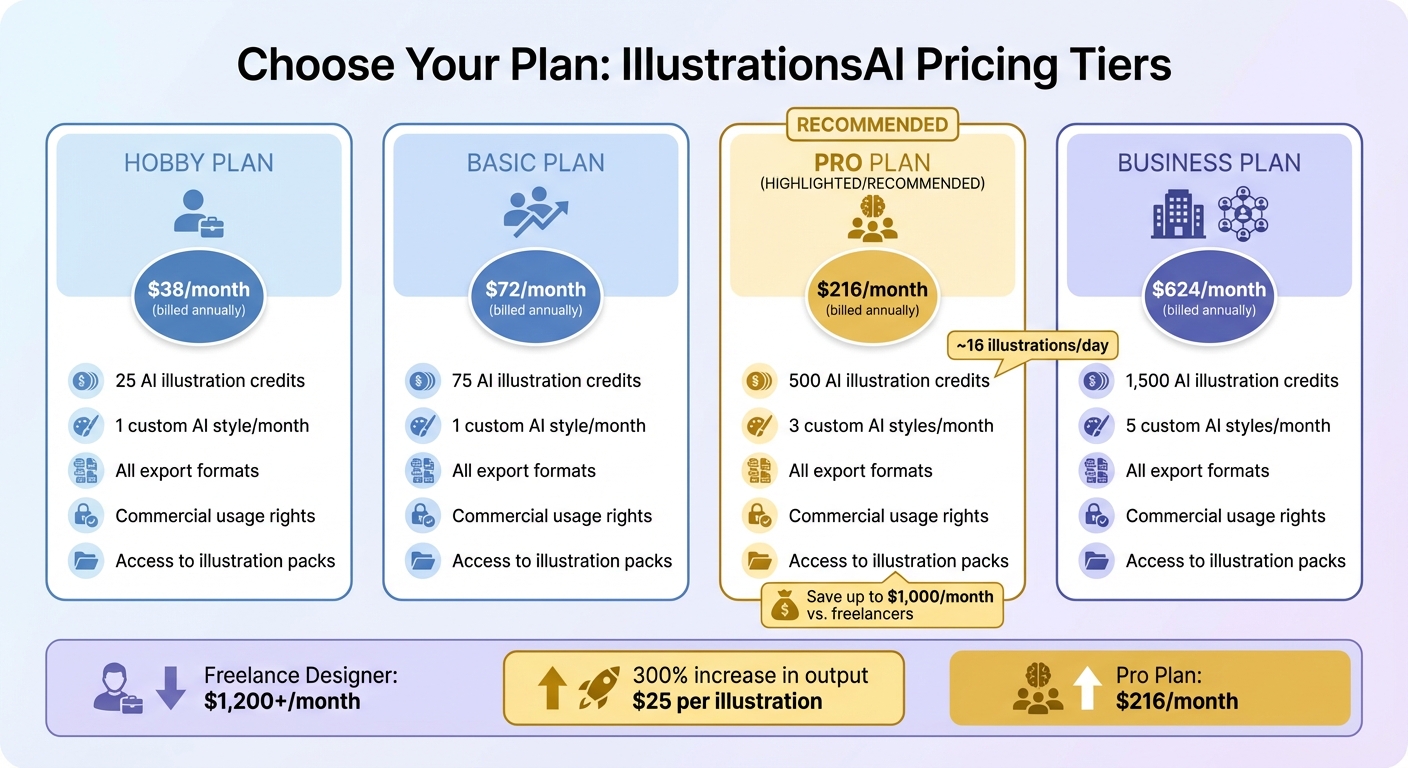
IllustrationsAI Pricing Plans Comparison for Small Businesses
As your business grows, so does the demand for visuals. Relying on traditional design methods can quickly become a bottleneck - both in terms of time and cost. That’s where IllustrationsAI comes in. With its flexible pricing plans, you can scale your graphics production seamlessly. Whether you need a few visuals or hundreds each month, these plans are designed to grow with your needs without draining your budget. This means you can keep up with market demands while keeping costs under control.
Compare the Pricing Plans
IllustrationsAI offers four pricing tiers to match different production needs:
| Plan | Monthly Price (Billed Annually) | AI Illustrations (Credits) | Custom AI Styles/Month | Export Formats |
|---|---|---|---|---|
| Hobby | $38 | 25 credits | 1 | PNG, JPG, WebP, SVG, AI, EPS |
| Basic | $72 | 75 credits | 1 | PNG, JPG, WebP, SVG, AI, EPS |
| Pro | $216 | 500 credits | 3 | PNG, JPG, WebP, SVG, AI, EPS |
| Business | $624 | 1,500 credits | 5 | PNG, JPG, WebP, SVG, AI, EPS |
Each plan includes commercial usage rights, access to illustration packs, and predefined styles. The key differences lie in the number of credits you receive monthly and how many custom brand styles you can create.
Plan Recommendations for Small Businesses
If you’re running a small business with moderate design needs, the Pro plan is likely your best bet. Priced at $216 per month (with annual billing), it gives you 500 credits for AI-generated illustrations and up to three custom brand styles. This is perfect if you’re managing multiple product lines or need distinct visuals for various campaigns. With 500 credits, you can produce around 16 illustrations daily - enough to cover everything from social media posts to email graphics, blog headers, and ad creatives, all while maintaining consistent branding.
Switching from freelance designers (who can cost upwards of $1,200 per month) to IllustrationsAI could save you a significant amount - potentially reducing costs to just $25 per illustration while increasing your output by 300%.
Best Practices for Creating Professional Graphics
Creating standout graphics requires clear communication, consistent branding, and attention to detail. These practices help ensure your visuals align with your brand and deliver a polished, professional look.
Write Better Prompts
The quality of your graphic starts with a well-crafted prompt. Instead of typing something generic like "coffee cup", aim for a detailed description: "a matte ceramic takeaway coffee cup floating against a narrow European-style city street, flat vector illustration, warm golden hour lighting from the side." This approach uses the Seven-Pillar Framework, which includes the Subject, Action, Scene/Setting, Medium, Composition, Lighting/Aesthetics, and Intent.
You can also use negative prompts to exclude unwanted elements, such as "--no text" or "--no blurriness." Additionally, define technical details upfront, like aspect ratios (e.g., 1:1 for Instagram or 16:9 for banners) and camera angles (e.g., bird's eye view or eye-level). These parameters ensure your graphic fits the platform it’s designed for.
Perfection rarely happens on the first try. Treat the initial image as a draft, and refine your prompt based on what you see. For example, if the lighting feels off or the composition needs tweaking, adjust those specific elements rather than starting from scratch. These refinements build on earlier steps, helping you achieve a more accurate result.
Keep Your Brand Consistent
Consistency is key to strong branding. Visuals that align with your brand identity reinforce recognition, and brand recall drives 38.7% of brand lift in emerging media, according to Nielsen.
"Brand recall is the biggest driver of brand lift in emerging media (38.7%), even more than baseline brand awareness." - Nielsen
Use IllustrationsAI's custom style settings to define your Core Style Parameters. Decide on elements like your artistic approach (flat, isometric, or 3D), complexity level (minimal or detailed), and line treatment (outlined or filled). Stick to the same hex color codes, typography, and logo placements across all visuals to strengthen brand recognition.
You can also train IllustrationsAI by uploading your top-performing visuals, such as social media posts or product images. This helps the system learn your specific textures, lighting preferences, and compositions. Think of your style as a living document - keep track of version updates (e.g., "v1.2 updated secondary color") to ensure all visuals remain aligned with earlier assets.
Use Editing Tools for Final Touches
Even with AI-generated graphics, small adjustments can make a big difference. After exporting your illustrations, use editing tools to crop images for various platform dimensions, tweak brightness and contrast, or add precise text overlays and logo placements.
Combining AI-generated visuals with traditional editing tools creates a hybrid workflow that delivers polished results without requiring advanced design expertise. This approach complements earlier steps, ensuring your graphics meet professional standards.
Before finalizing, take a close look at the details. Double-check for any inconsistencies and make sure your visuals are polished and ready for their intended use.
Conclusion
Why spend 10–15 hours on manual design when IllustrationsAI can cut that down to under an hour? With this tool, you can crank out a month's worth of content in just one afternoon. That means more time for running your business while still keeping a polished, professional look across all your marketing channels.
IllustrationsAI takes care of the repetitive design work so you can focus on growing your business. Its brand kit automatically applies your logos, colors, and fonts, ensuring your visuals stay consistent without extra effort. Businesses leveraging AI design tools have seen productivity jump by as much as 50%. And here's the kicker: content with relevant visuals gets 94% more views. That’s a game-changer for engagement and brand recognition.
"The 'right' AI tool for your business is one that's easy to learn, affordable, and helps you achieve the professional-looking visual assets you need." - Emily Heaslip, Contributor, CO- by US Chamber of Commerce
Whether you’re just starting with the Hobby Plan or managing high-volume needs with the Pro Plan, IllustrationsAI adapts to fit your workflow. From social media posts to email banners, the platform supports a range of uses, offering full commercial licensing and multiple export options. This flexibility ensures your brand stays cohesive while simplifying your creative process.
Getting started is easy: upload your brand reference images, craft clear prompts using the earlier techniques, and let the AI handle the heavy lifting. In minutes, you’ll have polished visuals ready to go. By tackling the common challenges of cost, time, and consistency, IllustrationsAI offers a streamlined solution - from building a strong brand identity to delivering platform-ready visuals that get results.
FAQs
When training your brand's style, there's no magic number of images you need to upload. Instead, aim for a small, thoughtfully chosen collection of assets. This might include your logos, color palettes, and key visuals that capture your brand's essence. These carefully selected elements are usually all the AI needs to generate consistent, brand-aligned graphics. Remember, quality and relevance always outweigh quantity.
If you want AI to create stunning illustrations, the key is in crafting detailed, specific prompts. Include information about the style, subject, color palette, mood, and any key elements you want in the image. The more precise you are, the better the results.
For example, instead of saying "a sunset", try something like: "a vibrant sunset over a mountain range in a watercolor style." This level of detail helps the AI understand exactly what you're looking for, leading to more polished and visually appealing outputs.
When it comes to web use, stick with PNG or SVG. PNG delivers excellent quality and supports transparency, making it great for detailed images. SVG, on the other hand, is perfect for scalable vector graphics, ensuring your visuals look sharp at any size.
For print, opt for PDF or AI for the best results. These formats maintain fonts, images, and color precision, which are crucial for professional-quality prints. While PNG can work for print if it's set to 300 DPI, PDF or AI remains the top choice for high-resolution output.

Meet the Author
Vignesh Rao Y
Vignesh is driven by ideas that create a tangible impact. At Illustrations AI, he specializes in content that helps designers and marketers speed up their creative workflows. When he's not turning complex ideas into simple visuals, you might find him lost in a book, jotting down ideas in his notebook, or connecting the dots others overlook.