SVG vs PNG: Best Format for Web Illustrations
Choosing between SVG and PNG depends on your specific needs. Here’s the quick answer:
- SVG is best for logos, icons, and graphics that need to scale without losing quality. It’s lightweight for simple designs, supports animation, and offers SEO benefits.
- PNG is ideal for detailed visuals like photographs, screenshots, or complex artwork. It maintains high-quality details but can result in larger file sizes.
Key differences:
- Scalability: SVG scales perfectly; PNG pixelates when enlarged.
- File Size: SVG is smaller for simple graphics; PNG handles complex textures better.
- SEO: SVG is crawlable by search engines; PNG relies on alt text.
- Transparency: Both support transparency, but PNG excels with intricate edges.
Quick Comparison:
| Feature | SVG (Vector) | PNG (Raster) |
|---|---|---|
| Scalability | Infinite scaling, no quality loss | Loses quality when enlarged |
| File Size | Smaller for simple graphics | Larger, especially for details |
| Resolution | Resolution-independent | Resolution-dependent |
| Animation | Supports animation | Static only |
| SEO Value | Crawlable XML structure | Relies on alt text |
| Best For | Logos, icons, simple illustrations | Photos, screenshots, detailed art |
Bottom line: Use SVG for scalable, simple graphics and PNG for detailed, pixel-perfect visuals. Both formats have their strengths - pick the one that aligns with your project’s goals.
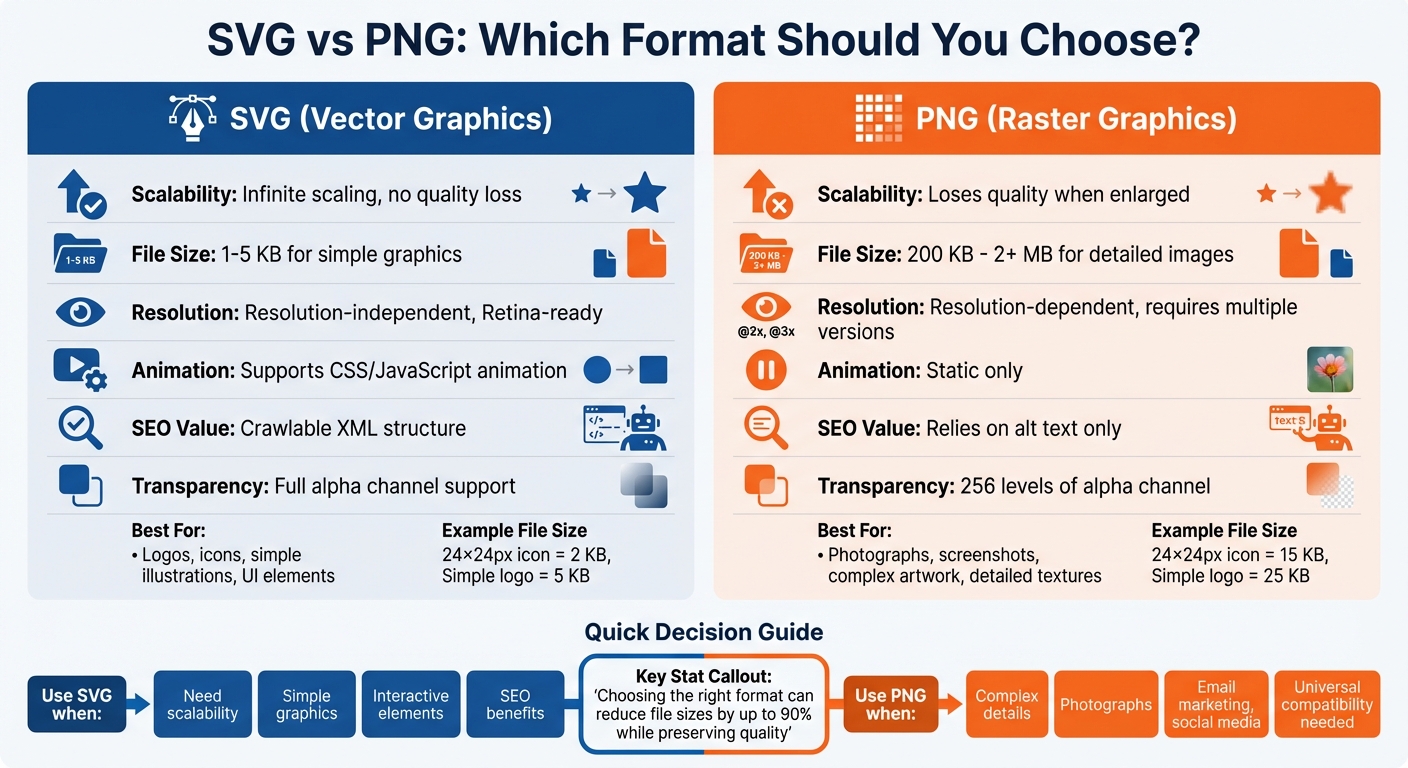
SVG vs PNG Format Comparison: Scalability, File Size, and Best Use Cases
SVG vs PNG: What Are the Differences and When to Use Them
This section provides a quick overview of the image format and how it works, covering its key characteristics, strengths, and limitations in simple terms. By the end, you’ll have a clear understanding of when this format is the best choice for your use case.
What is SVG?
SVG, or Scalable Vector Graphics, is a vector-based format that uses XML to define shapes, paths, and lines through mathematical formulas. This allows browsers to adjust its points dynamically when resized.
The result? Crystal-clear graphics at any size - whether it’s a tiny 16-pixel favicon or a massive billboard. No pixelation, no blurring, and zero quality loss.
"An SVG... simply recalculates its mathematical points to fit the new size. This means your logos, icons, and user interface elements will look sharp and professional on any screen, from a small smartphone to a large retina display." – Itamar Haim, SEO Team Lead, Elementor
Since SVGs are text-based files embedded in the Document Object Model (DOM), they offer flexibility. You can style them with CSS, animate them using JavaScript, and even change colors on hover. Plus, search engines can crawl the XML content, and you can include <title> and <desc> tags to improve accessibility.
How SVG Works
SVG files are essentially XML code that describe geometric shapes using mathematical instructions. If you open an SVG in a text editor, you’ll see readable XML lines defining shapes like circles, rectangles, or paths.
When a browser processes an SVG, it reads these instructions and renders the image in real-time. This resolution independence makes SVGs ideal for high-DPI and Retina displays, where raster images often appear blurry.
For simple graphics like logos or icons, SVG files are impressively lightweight - usually between 1KB and 5KB. Describing a circle in code takes far less space than mapping out thousands of individual pixels. Tools like SVGO can further compress SVGs by removing unnecessary metadata and comments, making them even more efficient.
This technical simplicity unlocks a range of design possibilities.
Benefits of Using SVG
SVGs shine when it comes to delivering scalable graphics across devices and screen sizes. A logo, for example, will look flawless whether it’s viewed on a smartphone, a desktop, or a 4K monitor - without requiring multiple file versions.
From an SEO perspective, SVGs offer an edge. Unlike binary image formats that rely solely on alt text, the XML structure of an SVG is fully crawlable by search engines, making it easier to optimize branding elements.
SVGs also support animation and interactivity. You can create hover effects, animated icons, and interactive visuals using CSS and JavaScript - all within a single SVG file. This makes them a go-to choice for modern web designs that prioritize dynamic and responsive elements.
Drawbacks of SVG
However, SVGs aren’t the right fit for every scenario. They struggle with complex images like photographs or detailed artwork. A photorealistic image with numerous paths and gradients can result in large XML files, which may slow down browser performance.
File size can also become an issue. While a simple icon might only be 2KB, a detailed illustration could easily exceed 500KB - significantly larger than a comparable PNG. This can impact page load times, especially on slower connections.
Compatibility isn’t perfect either. While modern browsers support SVGs almost universally (around 99%), older browsers like Internet Explorer 8 and earlier may have trouble rendering them. Email clients also tend to favor PNGs, making SVGs less reliable for email marketing campaigns.
Security is another concern. Since SVGs are executable code, they can contain malicious scripts, posing a risk of cross-site scripting (XSS) attacks. To avoid this, always sanitize SVG files before uploading them to your site, especially when using platforms like WordPress.
What is PNG?
PNG, or Portable Network Graphics, is a raster image format that constructs visuals pixel by pixel, making it perfect for capturing fine details and subtle color gradients. Unlike SVG, which relies on mathematical formulas, PNG stores data for every single pixel, ensuring precise visual representation.
This format uses DEFLATE lossless compression, which can shrink file sizes by 5–20% without sacrificing image quality. Its standout features include a broad color spectrum and advanced alpha-channel support. The standard 24-bit version can display over 16 million colors, while its alpha channel offers 256 levels of transparency. This allows PNG images to seamlessly blend into various backgrounds, far surpassing the basic on/off transparency of older formats like GIF.
However, PNG has a key limitation: it’s resolution-dependent. Since it uses a fixed grid of pixels, scaling up a PNG image often leads to pixelation and blurring. For instance, a logo that looks sharp at 200 pixels wide may appear blocky when stretched to 800 pixels. This makes PNG less adaptable for responsive designs that need to function across multiple screen sizes.
How PNG Works
PNG organizes its data using a chunk-based structure, with key sections like IHDR (header information), IDAT (image data), and IEND (file-end marker). Before compression, it applies a filtering process that analyzes pixel relationships to improve compressibility.
The format supports a range of color depths, including 8-bit indexed color (256 colors), 24-bit truecolor (8 bits per channel), and even 48-bit truecolor (16 bits per channel). PNG-8 is better suited for simple graphics with limited color palettes, while PNG-24 is ideal for detailed visuals requiring a full range of colors.
PNG can handle images up to 2,500 megapixels, which is more than sufficient for most web applications. Additionally, it enjoys universal browser compatibility, meaning your PNG images will display consistently across both modern and older platforms.
This technical foundation enables PNG to produce highly detailed images while maintaining reliability in web environments.
Benefits of Using PNG
PNG excels at rendering complex visuals with precise detail, thanks to its lossless compression. This makes it ideal for uses like screenshots, UI mockups, and interface elements, where sharpness and clarity are essential. Even text within PNG images remains crisp and legible, avoiding the blurriness often seen in lossy formats like JPEG.
Its advanced transparency capabilities are a major advantage for branding. Logos and icons with intricate edges can be placed over any background - whether solid colors, gradients, or photos - and will blend naturally without harsh borders. Additionally, PNG’s universal compatibility ensures it works seamlessly in older browsers, email clients, and social media platforms.
Drawbacks of PNG
One of PNG’s biggest downsides is its file size. Detailed images can easily range from 200KB to over 2MB, which may slow down page load times. For example, 20 high-resolution PNGs could add up to 40MB, whereas JPEG or WebP alternatives might reduce that by over 90%.
For simpler graphics, PNG can be overkill. A minimalist logo that’s just 2KB as an SVG could balloon to 50KB as a PNG, unnecessarily increasing bandwidth usage. Additionally, since PNG is pixel-based, creating the same graphic at different sizes for mobile, desktop, and print requires exporting and managing multiple files. Scaling up a PNG image often results in jagged edges and pixelation, compromising its original quality.
Finally, PNG offers no extra SEO benefits. Unlike SVG, which has a searchable XML structure, PNG is a binary format that search engines can’t directly crawl or index beyond standard alt text.
SVG vs PNG: Side-by-Side Comparison
Feature Comparison Table
| Feature | SVG (Vector) | PNG (Raster) |
|---|---|---|
| Scalability | Infinitely scalable without quality loss | Loses quality and pixelates when enlarged |
| File Size | Extremely small for simple graphics (e.g., 1–5 KB), but grows with complexity | Generally larger due to lossless compression |
| Resolution | Resolution-independent (Retina-ready) | Resolution-dependent; may require multiple versions (e.g., @2x, @3x) |
| Animation | Supports animation via CSS, JavaScript, or SMIL | Static (no native animation) |
| SEO Value | Text-based and crawlable by search engines | Binary format; relies on alt text for SEO |
| Transparency | Full alpha channel support | Full alpha channel support (256 levels) |
| Best For | Logos, icons, and simple illustrations | Photographs, screenshots, and complex artwork |
Next, let’s explore how these formats handle resizing and visual clarity.
How Each Format Handles Scaling
SVG files excel when it comes to scaling. They adjust their vector points dynamically to fit any size, ensuring sharp and crisp visuals whether displayed on a small smartwatch screen or a massive 4K monitor. PNG images, however, are tied to their original pixel dimensions. Enlarging a PNG beyond its native size leads to pixelation, making it look blurry or blocky. To address this, developers often create multiple versions of the same image (e.g., @2x or @3x) to accommodate high-resolution displays, which can complicate asset management.
File Size and Loading Speed
File size plays a key role in how quickly a webpage loads, and SVG often has the upper hand for simple graphics. For instance, a basic 24×24 px icon might be just 2 KB as an SVG but could grow to around 15 KB as a PNG. Similarly, a simple logo that’s 5 KB in SVG format could expand to about 25 KB when converted to PNG. Since images account for roughly 50% of a webpage's total weight, choosing the right format can directly improve loading speeds and even boost Core Web Vitals.
That said, when dealing with complex artwork, PNG can sometimes be more practical. An SVG packed with thousands of vector points may end up being larger and more demanding for browsers to process. For intricate designs with detailed textures and a wide range of colors, PNG’s pixel-based structure often provides better performance despite its larger file size.
When to Use SVG vs PNG
Best Uses for SVG
SVGs shine when you need scalable graphics. They're perfect for logos, icons, UI elements, and data visualizations because they look sharp on any screen - whether it's a smartwatch or a 4K monitor. With SVGs, there's no need to create multiple versions for different sizes, saving both time and effort.
Another advantage of SVGs is their code-based structure, which makes them highly versatile. You can add animations, hover effects, and even color changes, making them a great choice for digital marketing campaigns. Think animated infographics or interactive diagrams - SVGs deliver high-quality visuals while keeping users engaged.
There’s also an SEO bonus with SVGs. Since their XML-based code is crawlable, they can include internal <title> and <desc> tags. This not only improves accessibility but also helps with search discoverability, giving your graphics an extra edge.
Best Uses for PNG
While SVGs are great for scalable and interactive designs, PNGs excel in handling intricate and detailed visuals. If you're working with screenshots, photographs, or illustrations that have complex textures or gradients, PNG is the way to go. Unlike SVGs, which rely on vector paths, PNGs can handle these details more efficiently without bloating file size. In fact, for highly detailed artwork, a well-optimized PNG can often load faster than an SVG filled with countless mathematical paths.
PNG is also more reliable for email marketing and social media. Many email clients - especially older ones like certain versions of Outlook - don’t support SVGs, so PNG becomes the safer option for email signatures and templates. On social media, where platforms generally don’t allow direct SVG uploads, PNG ensures your graphics display correctly, making it the go-to format for brand illustrations and promotional content.
For e-commerce, PNG works wonders for detailed "sale" badges, transparent product overlays, or graphics requiring pixel-perfect precision. Its support for full transparency, with 256 levels of alpha channel, makes it ideal for blending seamlessly into various backgrounds.
Conclusion
Deciding between SVG and PNG boils down to understanding your project's specific needs. SVG stands out for its scalability, making it ideal for logos, icons, and simple graphics that need to look sharp at any size while often resulting in smaller file sizes. On the other hand, PNG shines in handling intricate details, making it the preferred choice for detailed illustrations, screenshots, and visuals requiring pixel-perfect accuracy.
"Choosing between SVG and PNG isn't about finding a single 'best' format, but about picking the right tool for the job." - Silas, Founder, Flavor365
Your decision should match the visual and functional demands of your project. For scalable logos or interactive animations, go with SVG. For detailed product visuals or email graphics, PNG is the better option.
Selecting the right format can significantly reduce file sizes - by up to 90% - while preserving image quality. This can improve your site's loading speed, enhance user experience, and even boost SEO rankings. For example, a simple 24x24px icon might be just 2KB as an SVG compared to 15KB as a PNG.
Ultimately, both formats are indispensable in web design. Each project should be assessed individually, factoring in scalability, file complexity, compatibility, and performance goals. By applying these principles, you can optimize your site's performance and make a stronger visual impact.
FAQs
SVGs shine when you need graphics - like logos, icons, or illustrations - that look crisp and clear no matter the size. Because they're vector-based, SVGs can scale endlessly without losing quality, making them perfect for responsive designs or high-resolution screens.
Another advantage? SVG files are usually smaller for simpler graphics, which can boost website loading speeds and overall performance. Plus, if your project involves interactivity or animation, SVGs offer far more flexibility compared to PNGs.
Using SVG files offers several SEO advantages. For starters, SVG images are usually smaller in file size compared to PNG images. This reduced size contributes to faster page load times, which is a crucial factor in search engine rankings. Pages that load quickly not only rank better but also deliver a smoother user experience.
Another key benefit of SVG files is their code-based structure. This allows the text within SVG images to be indexed by search engines, unlike PNG files, which are pixel-based and lack this level of readability. As a result, SVG files make it easier for search engines to process and understand your content. For websites looking to improve both performance and accessibility, SVG files often come out as the smarter option.
Yes, SVG files can carry security risks if not managed carefully. Because they are XML-based, SVGs can embed harmful elements like malicious scripts or even phishing attempts. This opens the door for potential exploitation if these files are uploaded or used without proper precautions.
To reduce these risks, make sure to sanitize SVG files thoroughly before uploading them to your website. Stick to trusted sources when sourcing SVG content, and prioritize strong security measures to safeguard your site and its users from potential threats.

Meet the Author
Vignesh Rao Y
Vignesh is driven by ideas that create a tangible impact. At Illustrations AI, he specializes in content that helps designers and marketers speed up their creative workflows. When he's not turning complex ideas into simple visuals, you might find him lost in a book, jotting down ideas in his notebook, or connecting the dots others overlook.