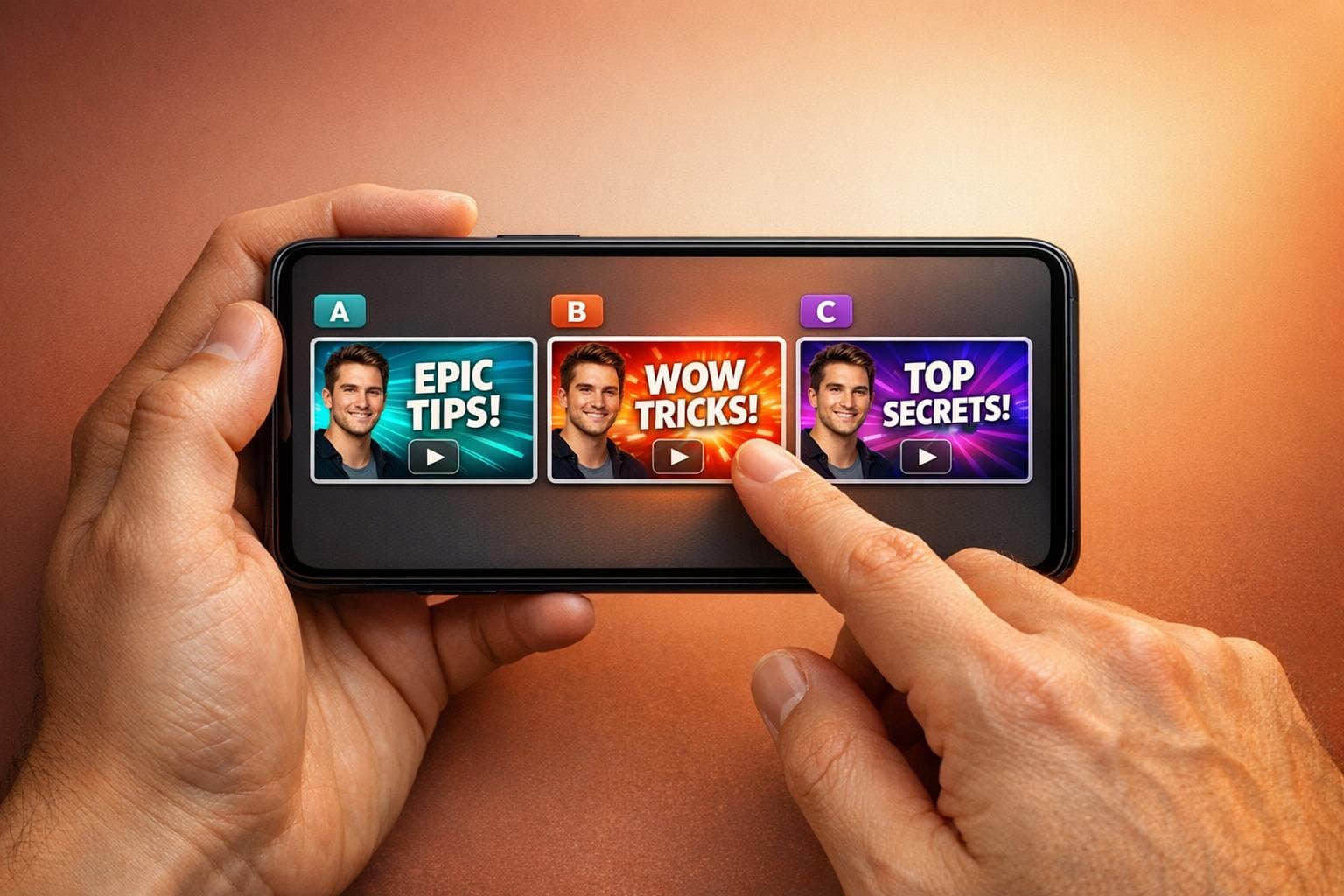
YouTube Thumbnail Illustration Ideas Using AI
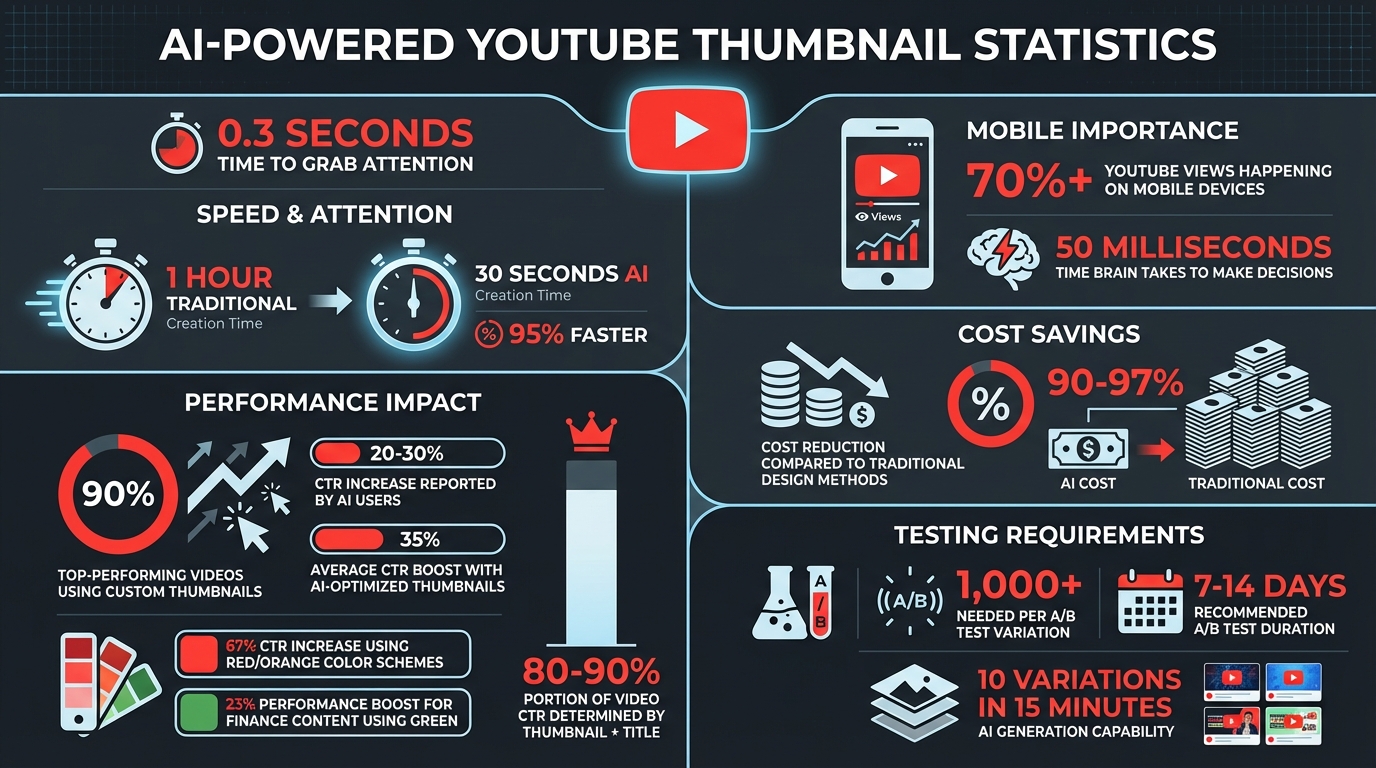
Your YouTube thumbnail gets just 0.3 seconds to grab attention. Here's why AI is changing the game:
- 90% of top-performing videos use custom thumbnails.
- AI tools like MidJourney, DALL·E 3, and Canva can cut thumbnail creation time from an hour to under 30 seconds.
- Creators using AI report 20-30% increases in click-through rates (CTR).
- Costs drop significantly - AI reduces expenses by 90-97% compared to traditional design methods.
AI helps with:
- Character illustrations: Create consistent avatars to strengthen your brand.
- Dynamic scenes: Build eye-catching, surreal backgrounds.
- Typography: Use bold fonts and high-contrast colors for better visibility.
- Niche-specific styles: Tailor thumbnails to match your audience's preferences.
- Brand consistency: Develop reusable templates to maintain a unified look.
- Emotional triggers: Use color psychology and expressions to drive engagement.
- A/B testing: Quickly create and test multiple designs to see what works best.
AI isn't just about speed - it enables better designs, faster experimentation, and higher CTRs. Start by defining clear prompts and testing thumbnails that resonate with your audience.
AI YouTube Thumbnail Statistics: Speed, Cost Savings, and CTR Performance
1. AI-Powered Character Illustrations
Create a Consistent AI Avatar for Your Channel
Using AI for character illustrations can significantly enhance your visual identity. By developing a recurring character or a stylized version of yourself, you create a brand image that stands out. When viewers scroll through their feeds, a consistent AI-generated character helps make your content instantly recognizable.
Tools like Midjourney's --cref (character reference) feature allow you to maintain a uniform character appearance across all thumbnails. For creators who want to add a personal touch, platforms like Replicate or InsightFace let you map your face onto various AI-generated avatars. This means you can appear in dynamic settings, like dramatic lighting or fantasy scenes, without the challenges or costs of traditional setups.
To make your characters attention-grabbing, try prompts like "shocked expression", "eyes wide", or "intense curiosity". These bold expressions can interrupt scrolling patterns, drawing viewers in. Jay Kim from Miraflow highlights the power of faces in thumbnails:
"Human faces still stop scrolls quickly... [they work] great for tutorials, opinions, breakdowns, and 'I'll explain this' content".
For clarity, apply the Squint Test: glance at your thumbnail and check if the character's expression and focus are instantly clear. If not, simplify the design by emphasizing a head-and-shoulders frame. This framing ensures your character remains recognizable, even on smaller mobile screens. Pair this with cinematic lighting or vibrant backgrounds to make your character pop against YouTube's interface.
Finally, maintain proper framing and consistency by generating characters with a --ar 16:9 aspect ratio. This matches YouTube's 1280×720 pixel standard. By combining these techniques, you can create thumbnails that are visually striking and aligned with your brand.
2. Dynamic Scene Compositions
Build Surreal Backgrounds That Stop the Scroll
AI tools make it easier than ever to create surreal environments that grab attention. Imagine scenes like underwater cities, erupting volcanoes, or futuristic labs - these kinds of striking backdrops can instantly spark curiosity.
Why does this work? Surprising visuals naturally make people want to click and learn more. The trick is to align the scene with your content's most dramatic or emotional moment. Start by drafting a "moment sentence" - for instance, "The experiment breaks" - to guide your creative prompt.
Since over 70% of YouTube views happen on mobile devices, it's essential to design scenes that work well on smaller screens. Use the Rule of Thirds to position your main subject slightly off-center. Pair this with prompts like "cinematic lighting", "wide-angle shot", or "bold colors" to make your thumbnail pop.
To test your design, try the Squint Test: blur your eyes slightly and see if the focal point still stands out. Simple, clear imagery is easier for the brain to process, which can lead to faster clicks. Stick to one main focal point - whether it’s a glowing object, a striking pose, or a symbolic item. Too many details can overwhelm viewers.
AI tools can dramatically speed up thumbnail creation, cutting production time by up to 95% and costs by 90–97% compared to traditional methods. When generating thumbnails, always include --ar 16:9 in your prompts to match YouTube's standard 1280×720 pixel format. For tweaks, tools like Midjourney’s Inpainting feature allow you to change specific elements - like background colors or props - without starting over.
3. Bold Typography Integration
Use AI to Match Proven Font Styles in Your Niche
Bold typography can make a huge difference in grabbing attention and reinforcing your brand message. When paired with dynamic visuals and consistent character designs, it becomes a key element in creating thumbnails that stand out.
AI tools can help you take the guesswork out of font selection. By analyzing successful thumbnails in your niche, these tools identify font styles, colors, and effects that have already proven effective with your audience.
"The 'best' font for your thumbnail is the one your audience already recognizes." - aithumbnailcreator.com
Keep your text short and impactful - 5 to 7 words is the sweet spot. The goal is to complement your title by creating urgency or sparking curiosity, not to repeat the same information.
For maximum impact, use bold sans-serif fonts like Impact, Bebas Neue, or Montserrat Black. Pair these with high-contrast color combinations (light text on dark backgrounds or vice versa) and add a solid outline or drop shadow to ensure the text remains readable, no matter the background. This not only improves visibility but can directly boost viewer engagement and click-through rates.
AI-generated backgrounds with built-in safe zones are another smart way to ensure your text stays unobstructed. And don’t forget the Squint Test - if you can still read the text when squinting, you’re on the right track.
4. Niche-Specific Illustration Styles
Tailor AI Prompts to Match Your Content Category's Visual Language
Each YouTube niche comes with its own distinct visual identity, and aligning your thumbnails with these expectations can make a big difference. AI illustration tools thrive when you provide detailed prompts tailored to your niche, making it easier to create designs that resonate with your audience.
For gaming or entertainment channels, think bold and dramatic. Prompts like "high-contrast, vibrant blue/orange or purple/yellow color schemes" work well. Studies show that thumbnails using red and orange tones can boost click-through rates by an impressive 67%. If your channel focuses on education or tutorials, try the "Clean Creator Close-Up" style. This involves a clear, expressive face paired with a simple gradient background - a look that feels polished yet approachable.
Beauty and luxury content calls for a more refined touch. Use prompts like "soft gradients, serif fonts, and high-contrast lighting" to create an elegant and premium feel. Finance channels, on the other hand, benefit from visuals that inspire trust and clarity. Ask for "Chart & Dashboard" styles featuring clean upward-trending graphics. For tech content, styles like "Minimal Object" or "Screenshot + Highlight" can help spotlight key features effectively.
It’s worth noting that thumbnails and titles together account for 80-90% of a video's click-through rate, so nailing your visual style is non-negotiable. Precision in your prompts is key. Instead of vague descriptions like "tech background", go for something more specific, such as "minimalist black background with neon blue circuit board." This level of detail ensures the AI generates visuals that feel authentic to your niche and instantly connect with your audience.
5. Consistent Brand Illustration Systems
Build a Reusable AI Prompt Template That Locks in Your Visual Identity
A consistent brand illustration system is key to making your channel instantly recognizable. By defining a master prompt that incorporates your brand's signature colors, lighting, and composition, you can create thumbnails that maintain a cohesive look. Instead of starting from scratch for each video, you simply adjust the subject while keeping the rest consistent. This approach creates a unified visual identity that viewers immediately associate with your brand.
For example, imagine your channel features a teal and orange color scheme with dramatic side lighting. Your master prompt might look like this: "16:9 YouTube thumbnail, teal (#00CED1) and orange (#FF8C00) color palette, dramatic 45-degree side lighting, subject positioned left-third, clean gradient background, high contrast, cinematic, --ar 16:9." For each video, you’d only swap out the subject description, like changing "fitness instructor demonstrating plank" to "fitness instructor holding dumbbells".
Character consistency is another powerful tool. Using Midjourney's --cref feature, you can lock in the same character appearance across all thumbnails. When combined with seed locking - where specific seed numbers ensure your visual style and composition remain steady - you further strengthen your brand identity.
To streamline the process even more, maintain a library of AI-generated branded assets. This allows you to quickly produce thumbnails that align with your established style.
"Your thumbnails need to communicate your brand identity without the shortcut of facial recognition." – Channel Farm
This level of consistency isn’t just about aesthetics - it drives performance. With over 70% of YouTube views happening on mobile devices, that tiny 160×90-pixel thumbnail needs to deliver instant brand recognition. It’s the difference between a viewer scrolling past or clicking through.
6. Emotional and Psychological Techniques
Use Color Psychology and Facial Expressions to Influence Viewers
A consistent brand illustration system sets the stage, but emotional triggers are what make your thumbnail stand out. These techniques tap into the subconscious, giving your thumbnail a persuasive edge.
Your brain makes decisions in just 50 milliseconds. With AI tools, you can create thumbnails that leverage this split-second processing by using color psychology and enhancing facial expressions.
Colors evoke instant emotional responses. For example:
- Red conveys urgency.
- Yellow grabs attention.
- Blue fosters trust.
For finance-related content, green works wonders - a green-themed thumbnail can boost performance by 23% when associated with money topics. Facial expressions are equally impactful. AI can amplify expressions to make them more engaging. Exaggerated or highly expressive faces can significantly increase click-through rates (CTR), with some studies showing they outperform neutral expressions by double.
The Curiosity Gap and Strategic Composition
Creating intrigue is another way to draw clicks. The "Curiosity Gap" technique uses AI to design visual elements that leave viewers wanting more. Examples include:
- Mystery silhouettes
- Blurred subjects
- Partially hidden scenes
These visuals create an information gap that compels viewers to click. Pair this with the Contrast Sandwich approach:
- A blurred background
- A high-contrast subject with a glow
- Bold, eye-catching text
This layered strategy interrupts patterns and grabs attention.
"Your thumbnail has about 50–500 milliseconds to win a click." – Ventress
To ensure your thumbnail works across devices, apply the Three-Second Rule. Shrink your design to 120 pixels and check if the emotion and message are still clear. If not, it may fail to engage mobile users effectively.
The results speak for themselves: AI-optimized thumbnails using these psychological tactics can increase CTR by an average of 35%, with some creators reaching over 45%. These aren't small gains - they could mean the difference between being ignored or driving consistent growth.
7. Rapid Iteration and A/B Testing
Create Multiple Variations Quickly and Test What Resonates
With a solid design framework in place, rapid iteration takes your AI-powered workflow to the next level. Imagine generating 10 different thumbnail designs in just 15 minutes - a task that used to take hours or even days.
The secret lies in using prompt templates. These templates help you stick to your brand's visual identity while quickly switching out elements like subjects, backgrounds, or facial expressions. Instead of making small, barely noticeable changes, let AI create dramatically different designs. For instance, compare a close-up emotional shot with a clean, object-focused minimalist layout. This approach uncovers which visual or emotional elements connect best with your audience.
"AI not only accelerates production but also expands testing capabilities." – Revid.ai
Before running live A/B tests, apply the Three-Second Rule. Shrink each thumbnail to 120 pixels and check if its emotion and message still come across clearly. If a design fails this mobile-friendly test, drop it immediately - over 70% of YouTube views happen on mobile devices. Starting with only the most effective designs ensures your testing process is both efficient and impactful.
Leverage YouTube's "Test & Compare" tool, but focus on watch time share, not just click-through rates. A thumbnail that attracts clicks but doesn’t keep viewers engaged can hurt your channel in the long run. To get reliable results, aim for at least 1,000 impressions per variation and let tests run for 7–14 days. When paired with the speed and cost savings of AI, this process fine-tunes your visuals while being 95% faster and 90–97% cheaper than traditional design methods.
How to Make YouTube Thumbnails With AI (Without Design Skills)
Conclusion
AI is reshaping how creators design YouTube thumbnails, turning what used to take 30–60 minutes into a process that now takes under 60 seconds - all while cutting costs by an impressive 90–97%. But it’s not just about saving time or money. AI also enables creators to experiment with different designs, keep their branding consistent, and follow visual strategies that are proven to attract clicks.
The impact is hard to ignore. AI-driven designs have demonstrated an average 35% boost in click-through rates. Considering that thumbnails and titles together account for 80–90% of a video’s click-through rate, and that viewers form their decision in just 0.3 seconds, these advancements open up exciting opportunities for faster experimentation and more creative flexibility.
"AI doesn't replace your design instincts - it structures them." – Caleb Leigh, Founder, CreatorSkills
To get started, focus on creating clear briefs that define the emotional essence of your video. Use trusted thumbnail styles like "Before/After" or "Reaction Face" and experiment with bold variations. Always apply the Three-Second Rule at 120 pixels to ensure your design works on mobile devices, where over 70% of YouTube views take place. From there, let YouTube's built-in testing tools guide you toward the designs that truly perform.
FAQs
If you're new to creating thumbnails, tools like Canva make the process straightforward and beginner-friendly. Canva offers AI-powered features that allow you to generate designs and customize them based on descriptions. Here's how to get started:
- Browse through their wide selection of templates.
- Use the 'Generate Design' feature to create a base design.
- Personalize the design with your preferred colors, fonts, and images.
For a more prompt-driven approach, you can try Miraflow, an AI thumbnail generator. This tool lets you create polished thumbnails by either entering prompts or selecting from pre-made templates. It's a quick way to achieve professional-looking results without needing advanced design skills.
Both options make thumbnail creation simple and accessible, even for those with no prior experience.
To keep your AI character consistent across thumbnails, stick to a unified visual style. Use standardized colors, layouts, and templates. Start by creating a prompt template that includes your preferred style elements and a fixed aspect ratio. Then, apply this same template to every thumbnail. This method keeps your thumbnails aligned with your brand, making them instantly recognizable and reinforcing your channel’s identity for your audience.
If you want to test thumbnails effectively without hurting your watch time, focus on metrics like click-through rate (CTR), impressions, and engagement (such as watch time). The key is to test one element at a time - this could be the text, colors, or image - so you can pinpoint what works.
Run each variation for 7 to 14 days to collect enough data for meaningful insights. It’s also crucial that your thumbnails are not misleading. They should encourage clicks while keeping viewers engaged, ensuring your watch time doesn’t drop. This method allows you to fine-tune thumbnails to boost CTR without sacrificing retention or viewer satisfaction.

Meet the Author
Vignesh Rao Y
Vignesh is driven by ideas that create a tangible impact. At Illustrations AI, he specializes in content that helps designers and marketers speed up their creative workflows. When he's not turning complex ideas into simple visuals, you might find him lost in a book, jotting down ideas in his notebook, or connecting the dots others overlook.