
AI Illustration Generator Explained (Beginner-Friendly Guide)
AI illustration generators make creating professional visuals fast, easy, and accessible to everyone. With these tools, you can turn text descriptions like "a friendly robot holding a coffee cup in flat vector style" into high-quality images in seconds - no design skills needed. Here's what you need to know:
- How It Works: AI uses advanced algorithms to generate images from scratch, starting with random noise and refining it step by step.
- Why It’s Useful: Save time and money by skipping expensive designers or complex software. These tools also ensure consistent visuals for your brand.
- Key Features: Upload references, define styles, use precise prompts, and download in formats like PNG, SVG, or AI.
- Pricing: Plans range from $38/month for beginners to $618/month for teams, with options for pay-as-you-go.
Whether you're a small business owner, marketer, or content creator, AI illustration tools can help you create visuals tailored to your needs quickly and affordably.
Text to Image AI Art Tutorial for Beginners 2025
How IllustrationsAI Works
IllustrationsAI simplifies the process of creating illustrations into three straightforward steps: uploading references, selecting a style, and generating visuals. This user-friendly approach makes it easy to create professional-quality visuals, even if you don’t have a design background. The platform takes care of all the technical details behind the scenes, leaving you free to focus on your creative vision. These steps lay the groundwork for more detailed customization later on.
Uploading References and Choosing Styles
Start by uploading 10–20 high-resolution images in JPEG or PNG format (minimum dimensions of 1,000 pixels on one side). These references help the AI understand your brand’s aesthetic. To get the best results, organize your uploads into four categories: subject images, style references, composition examples, and color hierarchy.
The AI takes about 30 minutes to analyze your inputs and train a custom model tailored to your brand. Once the model is ready, you can select from predefined styles like SaaS, Minimal, 3D, Flat, or Comic - or stick with your own custom-trained style. You can even generate complete illustration sets using themed packs to ensure all visuals in your project work seamlessly together.
How the AI Creates Your Illustrations
The AI generates illustrations by following a structured formula: Subject + Style + Composition + Lighting/Rendering + Key Details/Color Palette + Quality. When creating prompts, use concise, comma-separated phrases for clarity. For example, a prompt like "friendly robot, holding coffee cup, flat vector style, bright colors, #FF6B35 accent, 4K quality" will yield better results than a full-sentence description. This method ensures that every element aligns with your brand’s identity.
For consistency, include specific Hex codes in your prompts (e.g., #FF6B35 for a signature orange). You can also refine your results by adding negative prompts like "no text," "no logos," or "no clutter" to avoid unwanted elements. Once your initial illustrations are generated, use tools like Generative Fill and Vary to fine-tune the final outputs.
File Formats and Download Options
IllustrationsAI offers a variety of file formats to suit different needs:
- SVG: Perfect for scalable icons and logos.
- PNG: Ideal for transparent backgrounds, great for social media.
- JPG: Standard format for web use.
- AI/EPS: Compatible with Adobe Illustrator for advanced editing.
- WebP: Optimized for faster website performance.
- PDF: High-resolution option for print layouts.
For web use, compress files to under 200KB to ensure your site loads quickly without compromising quality.
How to Create Illustrations with IllustrationsAI
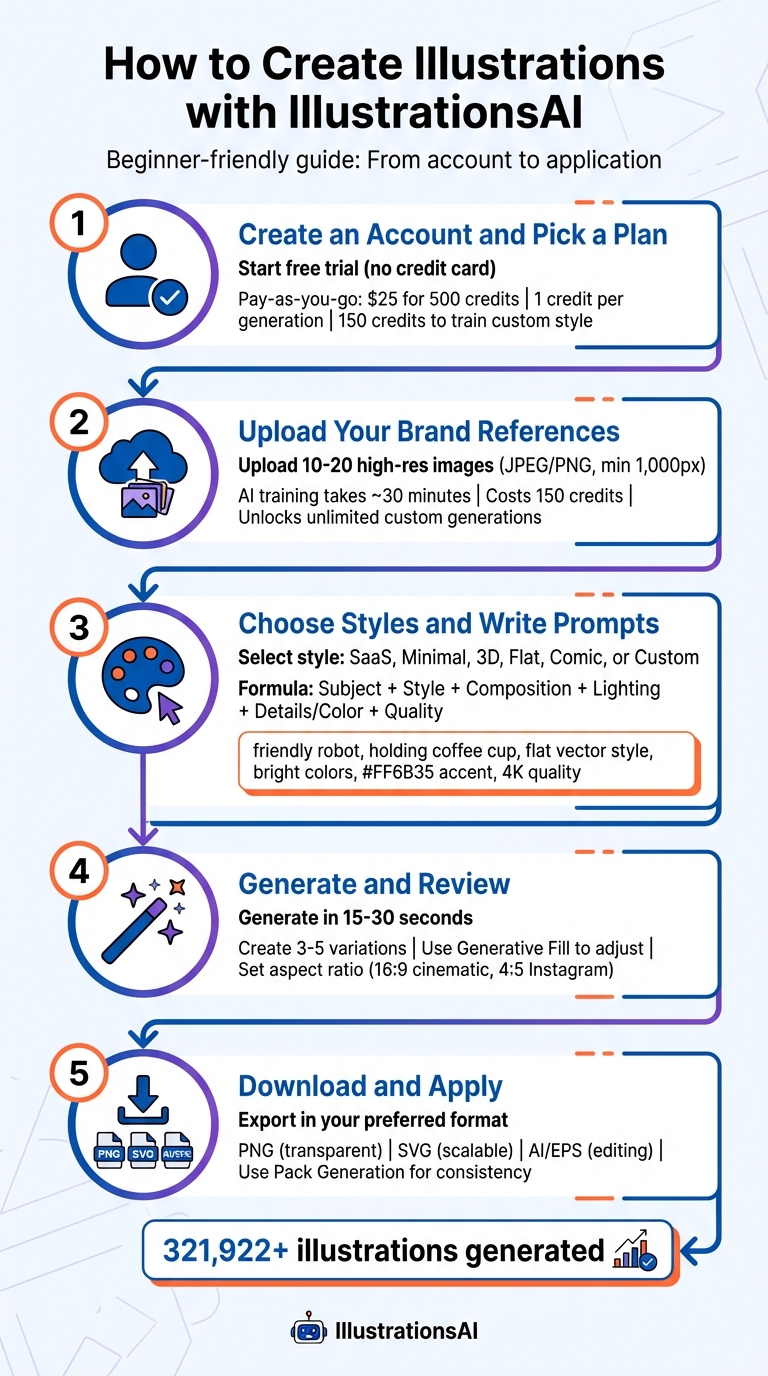
How to Create AI Illustrations in 5 Steps
Ready to bring your brand visuals to life? With IllustrationsAI, you can create custom illustrations in just a few straightforward steps. The platform has already generated over 321,922 illustrations, so you’re in good company.
Step 1: Create an Account and Pick a Plan
Start by visiting IllustrationsAI and clicking "Try for Free" - no credit card required. The free trial lets you explore predefined styles before you commit to a plan. When you’re ready, choose a subscription or go with the Pay-as-you-go option for $25 for 500 credits. Since credits don’t expire, this option is perfect for occasional projects. Standard generations cost 1 credit each, while training a custom AI style requires 150 credits. Features like background removal and the eraser tool also use 1 credit per action.
Once your account is set up, you’re ready to train your custom style.
Step 2: Upload Your Brand References
To create a personalized style, upload high-quality brand images that meet the platform’s requirements (refer to earlier sections for details). The AI takes about 30 minutes to analyze your images and develop your custom model. This process costs 150 credits but unlocks unlimited image generation in your unique style.
Step 3: Choose Styles and Write Prompts
Pick from predefined styles like SaaS, Minimal, 3D, Flat, or Comic, or use your custom-trained style. Writing an effective prompt is key. Use this formula: Subject + Style + Composition + Lighting/Rendering + Details/Color Palette + Quality. For example: "friendly robot, holding coffee cup, flat vector style, bright colors, #FF6B35 accent, 4K quality."
Be specific: instead of saying "dark blue", try "matte metallic midnight blue." Add negative prompts like "no text" or "no clutter" to avoid unwanted elements. If your brand colors are non-negotiable, include Hex codes to ensure accuracy.
Step 4: Generate and Review Your Illustrations
Click Generate and let the magic happen - your illustration will be ready in about 15–30 seconds. To get the best result, generate 3–5 variations and review them based on composition, color alignment, technical quality, and fit for your project. Need tweaks? Use the Generative Fill feature to adjust specific areas or click Vary for slightly modified versions. Don’t forget to set your aspect ratio before generating - 16:9 works well for cinematic layouts, while 4:5 is ideal for Instagram.
Once you’re happy with your results, it’s time to download.
Step 5: Download and Apply Your Illustrations
Export your illustration in the format that suits your needs: PNG for transparent backgrounds, SVG for scalable designs (available for Flat, Ink Drawing, Doodle, and Custom styles), or AI/EPS for advanced editing. If you’re working on a series, use Pack Generation to ensure consistency in line weight, color palette, and overall design.
With these steps, you’re all set to create illustrations that perfectly match your brand’s personality.
Benefits and Uses of IllustrationsAI
Main Benefits for Beginners
IllustrationsAI simplifies the design process, making it accessible even for those with no prior experience. By managing the technical aspects, the platform lets you focus entirely on your creative ideas. Two standout features are speed and royalty-free commercial licensing. Your illustrations are ready in seconds, not days, and you can use them in any project without worrying about licensing fees or restrictions.
Another key advantage is style consistency, which is essential for maintaining a cohesive brand identity. Whether you're working on a landing page, social media content, or email newsletters, the platform creates illustration packs that share a unified visual style. This ensures your graphics align perfectly with your branding efforts.
You’ll also have access to ready-to-use visuals tailored to various needs. Start with a general prompt and refine it using specific keywords like "minimalist" or "clean lines" to achieve the exact look you want. Plus, you can save successful prompts in your personal library, making it easier to maintain a consistent style across future projects.
Practical Applications for Different Projects
IllustrationsAI’s benefits extend to a wide variety of projects. For brand identity, it allows you to create custom illustrations for hero sections for your landing pages, intuitive app onboarding flows, or clear diagrams for help centers - all while staying true to your brand’s unique style.
In social media marketing, the platform helps you quickly generate on-brand visuals. Whether it’s an Instagram post in a 4:5 ratio or a Twitter header in 16:9, you can ensure visual consistency across platforms without extra effort.
For e-commerce, IllustrationsAI is perfect for creating product mockups, packaging designs, and prototype visuals. This is especially useful for testing new product ideas before committing to full production.
Even newcomers to design can immediately elevate their projects with these tools. Whether you’re working on email newsletters or presentation slides, the platform delivers polished visuals that enhance your message without causing distractions. Just remember to compress PNG files before uploading them to your website to keep load times fast and improve SEO. Adding descriptive alt text is another smart step to make your visuals more accessible.
IllustrationsAI Pricing Plans
Plan Comparison
IllustrationsAI provides four subscription options, each tailored to different needs and budgets. Here's a breakdown of what each plan offers:
The Hobby Plan is priced at $38 per month (billed annually) and includes 25 illustration credits. It's a great starting point for beginners or casual users. For those with slightly larger needs, the Basic Plan costs $71 per month and comes with 75 illustration credits, offering more flexibility for small projects or businesses.
The Pro Plan, which is the most popular, delivers 500 illustration credits and allows users to create three custom AI styles each month. Priced at $214 per month, it’s perfect for professionals managing multiple design projects. Meanwhile, the Business Plan is designed for teams with higher demands. At $618 per month, it includes 1,500 illustration credits and five custom AI styles monthly.
All plans come with full commercial-use rights and access to a library of predefined styles. Plus, upgrading your plan is simple - just a few clicks in your account settings, making it easy to scale as your needs grow.
For those on higher-tier plans, the cost per illustration can go as low as $0.33, making it an affordable way to produce high-quality visuals. Choosing annual billing can also save you up to 50% compared to monthly payments.
| Plan | Monthly Cost | Credits | Custom Styles | Best For |
|---|---|---|---|---|
| Hobby | $38/month | 25 | 1 per month | Beginners and casual users |
| Basic | $71/month | 75 | 1 per month | Small projects and businesses |
| Pro ⭐ | $214/month | 500 | 3 per month | Professionals with regular needs |
| Business | $618/month | 1,500 | 5 per month | Teams with high-volume demands |
These flexible plans ensure you can create visuals quickly and affordably, no matter your project size or frequency.
Conclusion
Key Takeaways
AI illustration tools are changing the game for beginners in visual content creation. With platforms like IllustrationsAI, you can create professional, brand-aligned illustrations in just minutes - no need for advanced training or hiring expensive freelancers. The platform simplifies the process by managing the technical details for you.
One major perk? Cost savings. You can export visuals in various formats, ensuring consistent branding across marketing materials, social media, and other digital projects. It's efficient, flexible, and accessible.
Keep in mind that crafting top-notch illustrations often requires some trial and error. Many users find success by generating 3–5 variations and tweaking their prompts. Start with broader ideas, then refine based on the AI's output. This process not only helps you get what you’re looking for but also teaches you how the tool interprets your inputs.
With these tools, you're set to take action right away.
How to Begin with IllustrationsAI
Ready to dive in? Getting started is simple. Choose a plan that fits your needs:
- The Hobby Plan costs $38 per month (billed annually) and includes 25 illustration credits, ideal for exploring the platform.
- The Pro Plan is designed for frequent users, offering 500 credits and three custom AI styles each month.
Once signed up, upload your logo, graphics, or preferred color schemes. From there, experiment with different styles and prompts. The platform allows you to test multiple variations and refine your results quickly. In just minutes, you’ll have polished, custom illustrations ready to download - with full commercial rights included.
FAQs
When choosing reference images for your AI-generated illustration, go for visuals that clearly highlight the subject, style, or details you aim to replicate. Opt for high-quality, well-lit images with minimal distractions or noise. Focus on selecting visuals that match your intended outcome, and pair them with prompts that are specific and detailed. This combination of clear inputs and aligned references will help guide the AI to produce more accurate and polished illustrations.
AI illustration generators often struggle to replicate brand colors perfectly. This happens because they rely on neural network models that interpret prompts, which can lead to subtle color shifts. To get closer to your desired hues, try being very specific in your prompts. For example, mention exact color codes like "#FF5733" or descriptive terms such as "bright pastel pink." It’s also a good idea to generate multiple images, as this increases the chances of finding a result that aligns with your expectations. These steps help address the natural variability in AI-generated visuals.
The number of credits you’ll need for your project depends on two main factors: the AI illustration tool you choose and the complexity of your project. Since these details can differ significantly between tools, it’s a good idea to check the specific tool’s guidelines or pricing information to get a clear estimate.

Meet the Author
Vignesh Rao Y
Vignesh is driven by ideas that create a tangible impact. At Illustrations AI, he specializes in content that helps designers and marketers speed up their creative workflows. When he's not turning complex ideas into simple visuals, you might find him lost in a book, jotting down ideas in his notebook, or connecting the dots others overlook.