How to Maintain Brand Guidelines Across All Visuals
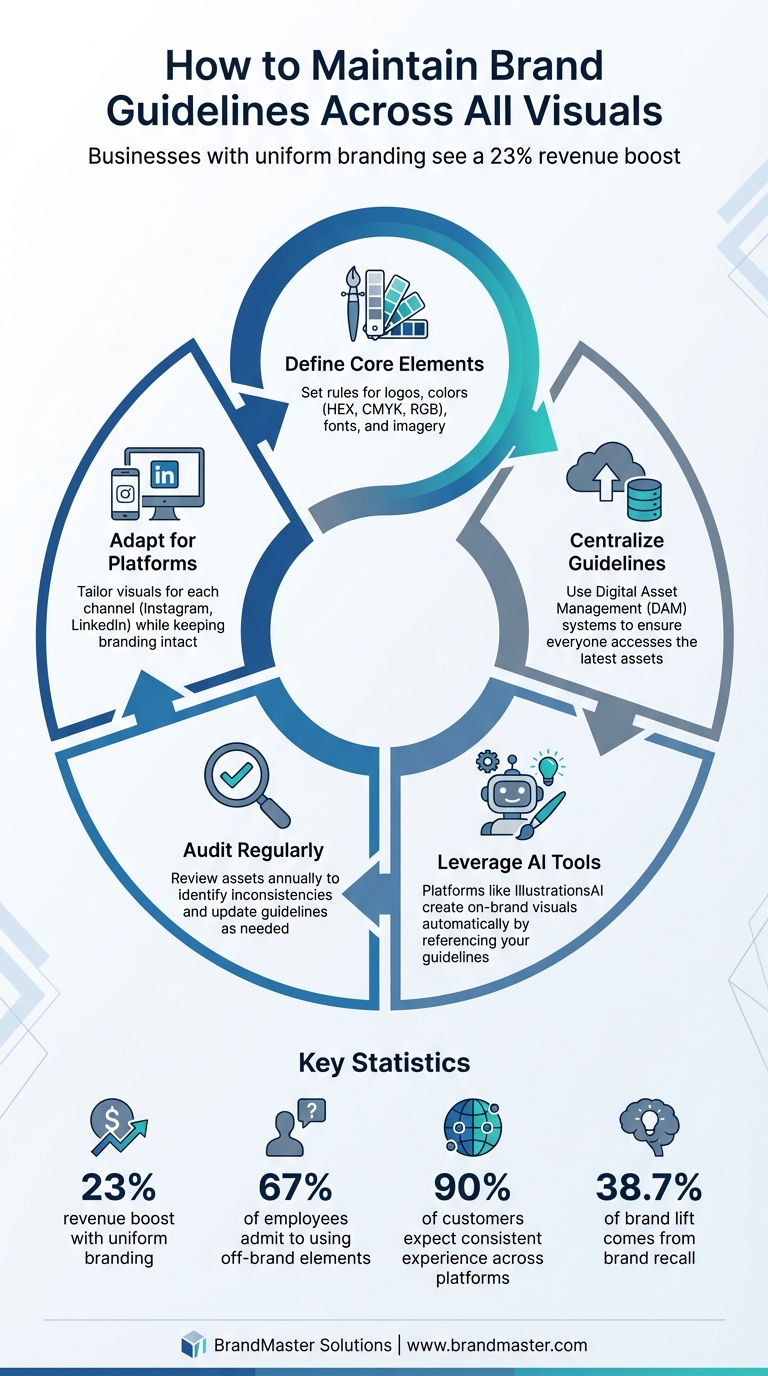
Maintaining consistent visuals across platforms is essential for building trust and recognition. Inconsistent branding - like varying logos, colors, or fonts - can confuse your audience and harm credibility. Businesses with uniform branding see a 23% revenue boost, while 67% of employees admit to using off-brand elements. Here's how to stay consistent:
- Define Core Elements: Set rules for logos, colors (HEX, CMYK, RGB), fonts, and imagery.
- Centralize Guidelines: Use tools like Digital Asset Management (DAM) systems to ensure everyone accesses the latest assets.
- Leverage AI Tools: Platforms like IllustrationsAI create on-brand visuals automatically by referencing your guidelines.
- Audit Regularly: Review assets annually to identify inconsistencies and update guidelines as needed.
- Adapt for Platforms: Tailor visuals for each channel (e.g., Instagram, LinkedIn) while keeping branding intact.
Consistency isn't just about looking good - it's about making your brand memorable and trustworthy. With clear rules, centralized tools, and regular updates, you can ensure every visual reinforces your brand identity.
5 Steps to Maintain Brand Guideline Consistency Across All Visual Channels
How To Create a Brand Guideline (REAL Client Example)
Setting Up Core Brand Guidelines for Visual Consistency
Create a visual identity guide to keep your brand consistent across all platforms and materials.
Define Key Visual Elements
Start by identifying the core visual components of your brand. For your logo, establish clear rules, such as:
- Full and secondary versions for different use cases
- Minimum size requirements to maintain clarity
- Adequate clear space around the logo
- Approved color variations (e.g., full color, black, and white)
It’s also helpful to include examples of what not to do - like stretching the logo, altering its colors, or placing it on cluttered backgrounds.
Your color palette is another essential piece. Specify primary and secondary colors with precise codes for every medium: HEX for web, CMYK for print, and RGB for digital. For typography, choose two to three typefaces and define their font families, weights, sizes, and spacing. Make sure to differentiate between styles for headlines and body text, so it’s clear which fonts go where.
Don’t forget to include guidelines for imagery and iconography. Outline the preferred styles for photos and design elements to ensure consistency across platforms. As Adobe explains:
"A brand style guide is the rulebook for everything you create, from what fonts to use to how logo treatments work with different color schemes".
Once these elements are defined, centralize them for easy access by your team.
Document Guidelines in a Centralized System
A static PDF isn’t enough. If your team frequently veers off-brand, it’s time to move your guidelines to a Digital Asset Management (DAM) system or a shared digital hub. This ensures everyone has access to the most up-to-date version.
Digital tools also eliminate version control headaches. For example, when you update your master logo, the changes can instantly reflect across your organization. Platforms like Creative Cloud Libraries let designers access approved colors and logos directly within their design tools. To maintain control, restrict editing permissions to brand managers. This prevents unauthorized modifications and makes it easier for everyone to follow the rules while keeping your brand identity intact.
Using IllustrationsAI for Brand-Compliant Visuals
IllustrationsAI takes your brand guidelines and turns them into a dynamic system that generates consistent, on-brand visuals automatically. By training the AI once, you can ensure every asset aligns with your brand’s identity.
Upload Brand References for AI Style Training
Start by uploading a collection of images that represent your brand’s look and feel. This could include your logo, standout social media posts, product shots, website banners, or existing illustrations that reflect your style. The AI will analyze these references to understand your brand’s textures, color schemes, composition preferences, and overall aesthetic.
Add detailed annotations to your images to guide the AI further. For instance, if your brand leans on soft shadows or dense visuals, make a note of it. Include technical details like lighting preferences (e.g., "natural daylight, 4500K color temperature") or material textures (e.g., "matte finish with subtle grain"). These specifics help the AI maintain consistency in its outputs.
You can also establish rules for color usage. For example, define how your primary colors should dominate 60–70% of compositions, secondary colors 20–30%, and accent colors only 5–10%. This ensures a balanced and cohesive palette in every design.
IllustrationsAI transforms your static brand guidelines into a dynamic, living system. By storing your approved assets - like logos, HEX codes, typography rules, and design patterns - in the platform’s Brand Kit, the AI can consistently reference this centralized hub to create visuals that are always on-brand.
Generate Illustrations in Multiple Formats
Once your AI style is trained, you can quickly create brand-aligned illustrations for any purpose - whether it’s blog posts, social media, marketing materials, or print campaigns. IllustrationsAI supports both vector formats (SVG, AI, EPS) for scalable graphics and raster formats (PNG, JPG, WebP) for optimized digital use.
Vector formats are ideal for print and large-scale designs, while raster formats work best for digital platforms.
The platform also offers themed illustration packs and predefined styles. For example, if you’re running a campaign, you can apply your custom brand style to packs like "Digital Marketing" or "Wanderlust" to create a cohesive set of visuals in no time. All illustrations come with a royalty-free, commercial-use license, giving you the flexibility to use them across various projects.
Maintaining Multi-Channel Compliance with Workflow Checks
Your brand lives in many places - websites, Instagram posts, email campaigns, printed brochures, and YouTube videos - all at the same time. While each channel has its own technical demands, your brand identity needs to stay consistent. Without a structured system of checks, inconsistencies can creep in and weaken your brand's recognition.
Automate Style Matching for Different Channels
Your brand guidelines are the foundation for consistency, but relying solely on manual reviews can slow things down and leave room for errors. That's where automation comes in. AI-powered tools can compare your visuals to your brand guidelines and flag anything that’s off-brand. For instance, Adobe Workfront's AI Reviewer, currently in beta as of January 2026, can automatically review content for compliance with your brand’s voice, imagery, channel-specific rules, logos, and color palettes.
Another tool, IllustrationsAI, simplifies consistency by storing all your approved brand elements - like colors, composition rules, and style preferences - in one place. For teams juggling multiple formats, linked asset systems ensure that updates to key elements, such as your logo or color palette, automatically sync across all active design files. This eliminates the risk of outdated or mismatched assets slipping through.
Define Format-Specific Guidelines
What works in one format might not translate well to another. For example, a logo that looks great on your website might be illegible on a printed business card. Digital media require HEX or RGB color codes, while print demands CMYK, Pantone, or spot colors. Your brand guidelines should clearly outline these variations to avoid confusion.
Every social media platform also comes with its own visual demands. Instagram and TikTok thrive on eye-catching designs with specific aspect ratios, while platforms like X (formerly Twitter) are more text-focused. Your guidelines should address these nuances: specify which logo variations work best for profile pictures, how much text to include in social graphics, and which illustration styles fit each platform’s tone.
To simplify this, create channel-specific templates that adapt to each platform while maintaining your brand’s core identity. For example, an Instagram template might feature bold colors and dynamic layouts, while a LinkedIn template leans on more muted tones and professional imagery. Both should share the same typography, logo treatment, and color palette. Tools like Adobe Express allow you to instantly apply brand palettes to graphics, while Premiere Pro’s "Auto Reframe" adjusts video aspect ratios for different platforms automatically.
Here’s why this matters: 90% of potential customers expect a consistent experience across all platforms. Consistent branding doesn’t just build trust - it can boost revenue by 10% to 20%. By tailoring your content to each channel’s requirements while sticking to your central brand guidelines, you create a unified identity that resonates everywhere. These format-specific details aren’t just nice to have - they’re the backbone of maintaining brand integrity as you adapt to different platforms. And as we’ll explore next, they also pave the way for regular visual system audits to keep everything in check.
Auditing and Updating Brand Visual Systems
Your brand guidelines should never feel like they're carved in stone. As your business expands, introduces new products, or adjusts its market positioning, your visual identity needs to grow alongside it. If you skip regular audits, you run the risk of creating visuals that no longer align with your goals or resonate with current market trends. Lara Kroeker from Forge and Spark describes it perfectly: "A brand visual audit is essentially a brand checkup". By combining automated workflow checks with these audits, you can ensure that every visual element evolves in sync with your overall brand strategy.
Set Up Regular Audits
Make it a point to review all your visual assets at least once a year. This includes everything - your website, social media graphics, presentations, and even internal documents. A comprehensive audit helps you catch inconsistencies before they snowball into bigger issues.
Organize your assets into categories like logos, typography, color schemes, and imagery. This approach makes it easier to spot patterns. For instance, you might notice your team overusing certain colors, mixing inconsistent fonts, or selecting imagery that no longer reflects your brand's personality. Regular audits help you identify these gaps and understand how internal practices might be straying from your intended brand identity. From there, you can develop templates and libraries to keep everything on track moving forward.
Use IllustrationsAI for Style Updates
If your audit shows that your visual identity needs a refresh, IllustrationsAI can help you bring everything back in line. By uploading new, on-brand references, you can retrain your AI styles and ensure that all future assets match your updated guidelines.
IllustrationsAI’s custom style feature acts as a dynamic system, unlike static PDF guidelines that quickly become outdated. As Frontify puts it, "Static files won't cut it: As your brand evolves, PDF guidelines become outdated fast". With the Business Plan, you can create up to five custom AI styles per month, giving you the flexibility to test and refine new visual directions as your brand evolves. This adaptability keeps your visual system consistent while ensuring it remains relevant. And consistency matters - brand recall contributes to 38.7% of brand lift in emerging media.
Conclusion
Keeping your brand’s visuals consistent isn’t just about aesthetics - it’s about building trust and ensuring your audience recognizes and remembers you. Did you know that brand recall accounts for 38.7% of brand lift in emerging media? That shows just how powerful visual consistency can be in driving results.
The real strength of your visual system lies in having clear, documented guidelines and tools that make execution seamless. With tools like IllustrationsAI, you can scale your brand’s visual identity effortlessly across different channels. By training custom AI styles based on your brand references, you ensure every new visual feels like a natural extension of your identity. The Business Plan even offers five custom AI styles each month, giving you the flexibility to tackle fresh campaigns while staying true to your core look.
Annual audits are also key to protecting your brand’s identity. Over time, teams can unintentionally drift from the original guidelines, but regular reviews - combined with IllustrationsAI’s dynamic style updates - help keep everyone on the same page. This ensures every visual asset aligns with your brand’s essence.
Finally, AI-powered workflows streamline your creative process without compromising quality. Simply upload your brand references to IllustrationsAI, and you’ll be able to generate polished, on-brand visuals in no time. It’s a smarter way to work that keeps your brand identity intact.
FAQs
To make sure your team always uses the most current brand assets, start by putting together a detailed brand style guide. This guide should outline the essentials - like how to use the logo, approved color schemes, typography rules, imagery guidelines, and the desired tone of voice. Keeping this guide updated ensures everyone works with the correct standards, minimizing any chance of inconsistencies.
Using centralized tools can make this process even smoother. Set up a shared platform or repository where your team can quickly find the latest approved assets. On top of that, offering training sessions on the brand guidelines and scheduling regular audits of your visual materials can help reinforce consistency. These steps are key to maintaining a unified and polished brand image across all platforms.
Using AI tools to keep your brand consistent offers some clear advantages. These tools make it easy to quickly create visuals that match your brand's identity, ensuring that elements like colors, fonts, and imagery stay aligned across different platforms - whether you're working on social media posts, website designs, or printed materials. By automating these processes, you can cut down on repetitive manual tasks, saving both time and effort.
Another benefit is the reduction of errors and inconsistencies, especially when multiple teams are involved in creating content. AI tools help standardize visual assets, which reinforces a polished and unified brand image - essential for building trust and recognition. Many of these platforms also include features to safeguard intellectual property and manage brand assets effectively, making it simpler to present a consistent message across all your marketing channels.
It's smart to routinely check your brand's visual elements to keep everything aligned. Experts often suggest doing these audits every quarter or at least twice a year. This ensures your visuals consistently match your brand guidelines across all platforms.
Frequent reviews make it easier to spot and fix inconsistencies before they become noticeable. This way, your branding stays unified across digital, print, and social media, helping you preserve your brand's identity and maintain a polished, professional look.

Meet the Author
Vignesh Rao Y
Vignesh is driven by ideas that create a tangible impact. At Illustrations AI, he specializes in content that helps designers and marketers speed up their creative workflows. When he's not turning complex ideas into simple visuals, you might find him lost in a book, jotting down ideas in his notebook, or connecting the dots others overlook.