How to Train AI for Brand-Specific Illustrations
Want custom visuals for your brand without spending thousands? AI tools like IllustrationsAI make it possible to create tailored illustrations in minutes - at a fraction of the cost. By training AI on your brand's colors, styles, and visual preferences, you can generate consistent, high-quality images for websites, social media, and more. Here's how it works:
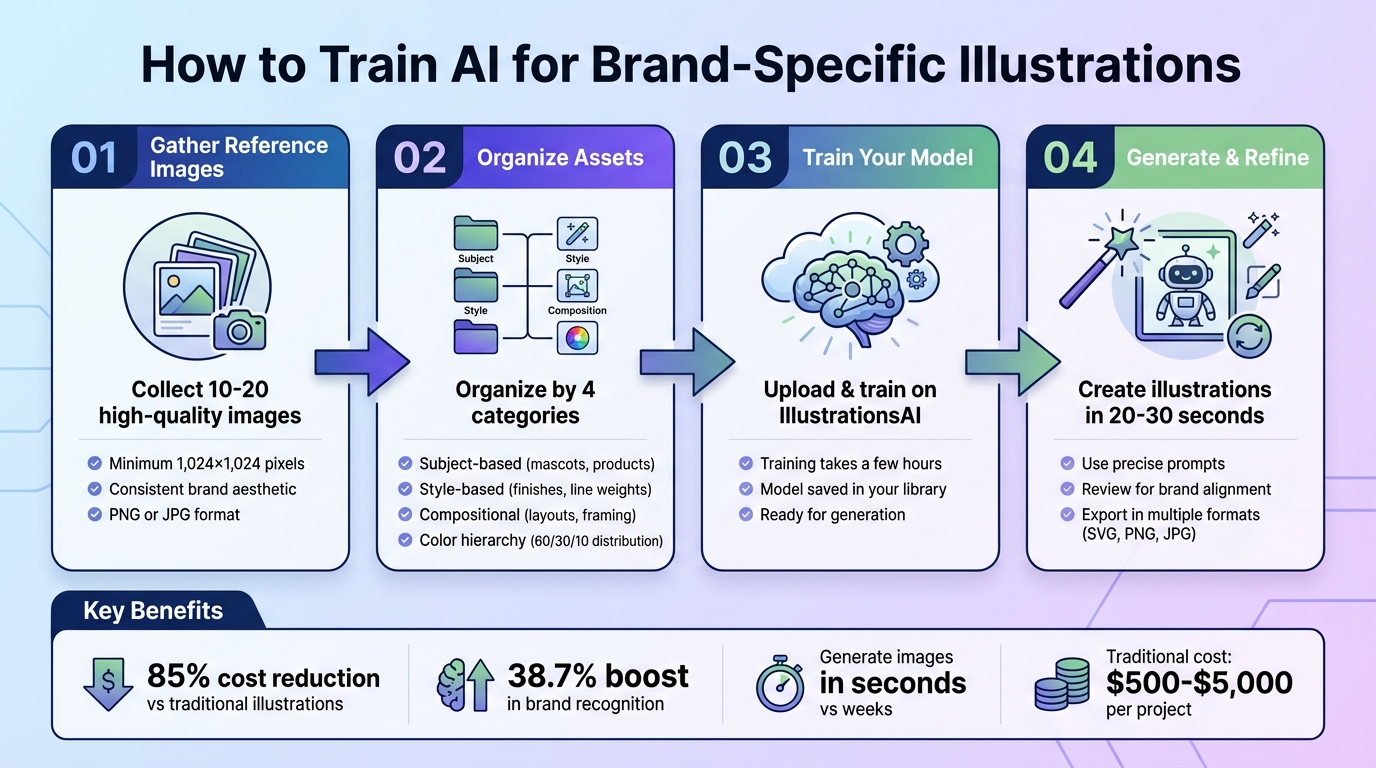
- Why it matters: Maintaining consistent visuals boosts brand recognition by 38.7%, while stock images lack originality and can dilute your identity.
- How AI helps: Upload 10–20 reference images that reflect your brand’s style (colors, textures, and layouts). The AI learns your "visual DNA" and generates illustrations with just a text prompt.
- Cost & time savings: Traditional custom illustrations cost $500–$5,000 and take weeks. With AI, you can cut costs by up to 85% and produce images in seconds.
Key steps to get started:
- Gather high-quality, consistent reference images (min. 1,024×1,024 pixels).
- Organize them by subjects, style, composition, and color hierarchy.
- Train your model on a platform like IllustrationsAI.
- Use precise prompts to refine outputs and ensure alignment with your brand.
With AI, you’re in control - no more stock images or long waits. Create visuals that match your brand identity quickly and efficiently.
4-Step Process to Train AI for Brand-Specific Illustrations
Create Custom Illustrations for Your Brand with Illustrations AI
Preparing Your Brand Assets for AI Training
The success of AI-generated illustrations hinges on the quality of the reference images you provide. These images act as a guide, teaching the AI your brand's visual style. The more consistent and well-curated your examples, the better the AI will mimic your aesthetic.
Selecting Reference Images
Begin by gathering 10–20 reference images that represent your brand's look and feel. These images should share a unified aesthetic - whether it's geometric flat design, watercolor textures, or bold line art. Including images that stray from this style can confuse the AI and lead to uneven results.
Organize your reference images into four key categories:
- Subject-based: Illustrations of mascots, products, or characters central to your brand.
- Style-based: Features like finishes (matte or glossy) and line weights.
- Compositional: Examples of layouts and framing.
- Color hierarchy: Visuals showcasing your brand's 60/30/10 color distribution.
If you're training the AI on characters, use solo shots of individuals at similar ages and avoid unnecessary accessories that could distract from the core design. Additionally, document style guidelines (e.g., "geometric flat design with rounded corners") to ensure consistency throughout your reference set.
Image Quality and Variety Requirements
High-quality images are essential. Use visuals with a minimum resolution of 1,024×1,024 pixels - lower resolutions can make it difficult for the AI to pick up on textures and intricate details. Avoid blurry or out-of-focus images, and stick to standard formats like PNG or JPG for seamless compatibility.
Diversity is just as important as image quality. Include a mix of close-ups, medium shots, and full-body views. This variety helps the AI understand how your brand's style translates across different scales and perspectives. The AI will analyze details like anatomy, proportions, materials, textures, and illustration features such as shading and line weight. By providing a diverse, high-resolution set of references, you'll set a strong foundation for the AI to accurately learn and replicate your brand's style during training.
Training Your Custom Model on IllustrationsAI
Once you've prepared your reference images, you're ready to train your custom AI model on IllustrationsAI. The platform simplifies this process into three main steps: setting up your account, uploading your assets, and starting the training.
Creating an Account and Choosing a Plan
IllustrationsAI offers four subscription options to fit different needs:
- Hobby: $36/month (billed annually), includes 25 illustrations and one custom style.
- Basic: $68/month, includes 75 illustrations and one custom style.
- Pro: $196/month, includes 500 illustrations and three custom styles.
- Business: $596/month, includes 1,500 illustrations and five custom styles.
All plans come with commercial rights and support exports in formats like PNG, JPG, WebP, SVG, AI, and EPS.
Select a plan based on how many illustrations you need each month and the number of custom styles you want to create. If you're working with multiple clients or managing several sub-brands, the Pro or Business plans are ideal for maintaining separate models tailored to each. This step is essential for unlocking all the customization features offered by IllustrationsAI.
Uploading Images and Defining Your Style
After picking your plan, head to the custom style section and upload 10–20 reference images. The platform accepts JPEG and PNG files with a minimum resolution of 1,024×1,024 pixels. Avoid uploading images with watermarks or speech bubbles. If you plan to export your illustrations as SVGs, steer clear of reference images with complex gradients or shadows, as these elements don't convert well to vector formats.
Give your model a name (e.g., "Brand_Geometric_Flat") and include a short description of its key style elements, such as primary colors, textures, and other distinctive features. To achieve the best results, upload a variety of images that showcase your brand's style across different subjects - people, objects, landscapes, etc. This diversity helps the AI better understand how to apply your aesthetic consistently across different types of illustrations.
Starting the Training Process
Once your images are uploaded, click "Start Training." The AI will analyze your assets and build a custom model. Training usually takes a few hours, depending on server activity. Once completed, your custom style will be saved in your library, ready to be used for generating new illustrations. With your model in place, you can create brand-specific images in just 20–30 seconds, ensuring every output matches your visual identity.
Creating and Refining Brand-Specific Illustrations
Once you've trained your model and gathered a curated collection of images, the next steps are all about fine-tuning: crafting precise prompts and refining outputs through iteration. This process ensures that the illustrations align perfectly with your brand identity.
Writing Effective Prompts
The key to generating consistent, brand-specific illustrations lies in writing clear and detailed prompts. Vague instructions like "create a simple icon" won’t cut it. Instead, include explicit technical details: for example, "2px uniform stroke weight, 4px corner radius, rounded line caps".
To maintain consistency, select a reference illustration from your curated set that embodies your brand's style. Use its description as a foundation for all future prompts. For instance, if your anchor image features a geometric design with flat colors and minimal shadows, ensure those elements are incorporated into every prompt.
You can also create reusable prompt templates tailored to different needs - social media, website headers, or email graphics. A template might look like this: "[Subject] + flat 2D style + 2px stroke + brand colors (#FF5733, #33C3FF) + minimal shadows + white background." Simply swap out the subject while keeping the style parameters intact. Generate multiple variations at once to spot and address any deviations from your desired style early on.
Reviewing and Adjusting Results
Once you’ve generated outputs, it’s time to review and refine. Use a checklist to evaluate each image: Does the composition align with your brand’s visual style? Are the colors accurate? Are there any noticeable AI artifacts, like distorted shapes or irregular symmetry?
If the colors seem off or unwanted elements keep appearing, adjust your prompts. For example, include specific hex codes like "background color #1E40AF" and use negative prompts such as "no text, no logos, no gradients" to filter out distractions.
If the results are still inconsistent, retrain your model with a smaller, more focused set of 10–20 reference images that clearly represent your target style. Quality matters more than quantity here. Each image should showcase the exact look and feel you want the AI to replicate.
To ensure a balanced color palette, stick to a 60-30-10 distribution: 60–70% primary colors, 20–30% secondary, and 5–10% accent shades. This structure creates visual harmony and avoids overloading any single color. Replace generic terms like "dark blue" with more descriptive phrases, such as "matte metallic midnight blue", and include details like "crisp outlines with bold negative space" for minimalist designs.
If necessary, export the AI-generated illustration and refine it further using design software. Combining AI's speed with human precision allows you to create polished visuals that truly reflect your brand identity.
Exporting and Applying Your Illustrations
Once you've fine-tuned your AI-generated illustrations, it's time to export them and integrate them into your brand's touchpoints. The format you select will depend on where and how you plan to use the illustration.
Available Export Formats and Licensing
IllustrationsAI offers several export options to suit a variety of needs:
- SVG files: Perfect for websites, icons, and logos due to their ability to scale infinitely without losing quality. They're also lightweight, typically under 10KB.
- PNG files: Ideal for marketing materials and social media posts, especially when transparency and lossless compression are needed.
- JPG files: A go-to for general web use and social media when smaller file sizes are more important than transparency.
- WebP: Great for modern websites, offering fast-loading, compressed images.
- PDF and AI formats: Best for print materials, as they preserve high-resolution vector data and layout integrity.
All illustrations generated through IllustrationsAI are royalty-free for commercial use, whether you're designing product packaging or running paid ad campaigns.
To optimize for web use, aim to keep image file sizes under 200KB to maintain site performance. For SVG files, consider code-level tweaks to ensure consistent stroke weights and exact hex color values across your assets. Using a clear naming convention, such as icon-[category]-[name]-[variant].svg, can help you efficiently manage your asset library.
Once you've chosen the right format, you're ready to apply these illustrations across your brand's key channels.
Where to Use Brand-Specific Illustrations
Custom illustrations strengthen brand recognition across various platforms, which is more than just a design choice - it’s a business strategy. Research indicates that 80% of consumers say brand recognition directly impacts their purchasing decisions.
You can incorporate these illustrations into emails, landing pages, digital ads, websites, blogs, and social media to create a cohesive visual identity. For e-commerce platforms, custom illustrations can enhance the user experience with category icons, checkout visuals, and promotional banners that guide customers through their shopping journey.
To maintain consistency, document essential design elements like composition style, visual hierarchy, and level of detail. Build a library of prompt templates using formulas such as [Subject] + [Style] + [Context] + [Mood] to ensure the AI consistently aligns with your brand guidelines. For projects requiring multiple related illustrations, use batch or pack generation tools to maintain uniform line weights and design language.
Lastly, include alt text for accessibility and ensure your illustrations meet WCAG color contrast standards. This ensures your visuals are inclusive while preserving your brand’s identity across every touchpoint.
Conclusion
Once you've refined and deployed your AI-generated visuals, the advantages of a custom-trained model become clear.
By training AI specifically for your brand’s illustrations, you gain three major benefits: creative control, efficiency, and consistency. While generic AI tools churn out visuals anyone can replicate, custom-trained models reflect your brand’s distinct personality - whether through unique mascots, product designs, or artistic styles.
Design timelines that traditionally stretched across weeks can now be reduced to minutes, allowing you to produce hundreds of consistent assets every month. As the SVG AI Team explains:
"The prompt is your style guide. When you use an AI SVG Generator with carefully structured prompts, you're essentially programming the AI to follow your brand guidelines automatically".
This automation empowers even non-designers to create visuals that align with your brand, eliminating the need for constant supervision.
The financial advantages are just as compelling. Custom illustrations that typically cost $500–$5,000 per project can be replaced with a scalable AI-driven solution. This system not only saves money but also ensures uniformity across hundreds of assets - something that would be nearly impossible with manual methods.
With a custom-trained model, you retain complete creative control. You’re no longer reliant on stock images that competitors might also use, nor are you waiting on external designers to interpret your vision. Instead, your AI model becomes a creative partner, consistently applying your brand's visual language across all touchpoints - from social media graphics to e-commerce banners and email campaigns. Careful asset selection and precise prompt engineering make this possible, ensuring your brand’s visuals stay cohesive and recognizable.
The outcome? A visual identity that customers immediately connect with, fostering trust and brand recall - two factors that directly influence purchasing decisions. With IllustrationsAI, you’re not just generating images; you’re building a scalable system to maintain your brand’s visual identity across every channel.
FAQs
If you don’t yet have 10–20 brand illustrations, start small with a handful of high-quality reference images that reflect your brand’s style, color palette, and design preferences. These initial images can serve as a foundation for training the AI. Over time, as you produce more visuals, grow your collection to hit the recommended number. This approach ensures your brand visuals remain consistent and tailored as your library expands.
To keep AI-generated content on track, it's essential to provide clear and detailed instructions. Define your style, tone, and constraints precisely. Using structured prompts and visual guidelines can help steer the AI in the right direction, ensuring consistency throughout the output. By setting these parameters upfront, you can reduce unnecessary elements and ensure the results align with your brand's identity.
When working on the web, choose the right format for your graphics: SVG is perfect for scalable graphics, PNG works well when you need transparency, and JPEG is best for photos or detailed images that need smaller file sizes.
For print projects, go with PDF or native AI files to ensure top-notch quality and smooth compatibility with professional printing setups. PDFs are great for combining both raster and vector elements, while AI files are widely accepted by printers for their flexibility and precision.

Meet the Author
Vignesh Rao Y
Vignesh is driven by ideas that create a tangible impact. At Illustrations AI, he specializes in content that helps designers and marketers speed up their creative workflows. When he's not turning complex ideas into simple visuals, you might find him lost in a book, jotting down ideas in his notebook, or connecting the dots others overlook.